
Intelligent Chatbot
Help residents find information about your planning consultation at any time. ConsultOnline’s intelligent chatbot uses your published documents, FAQs and pages to generate answers, show supporting source links and direct people to your team when it cannot find suitable information.
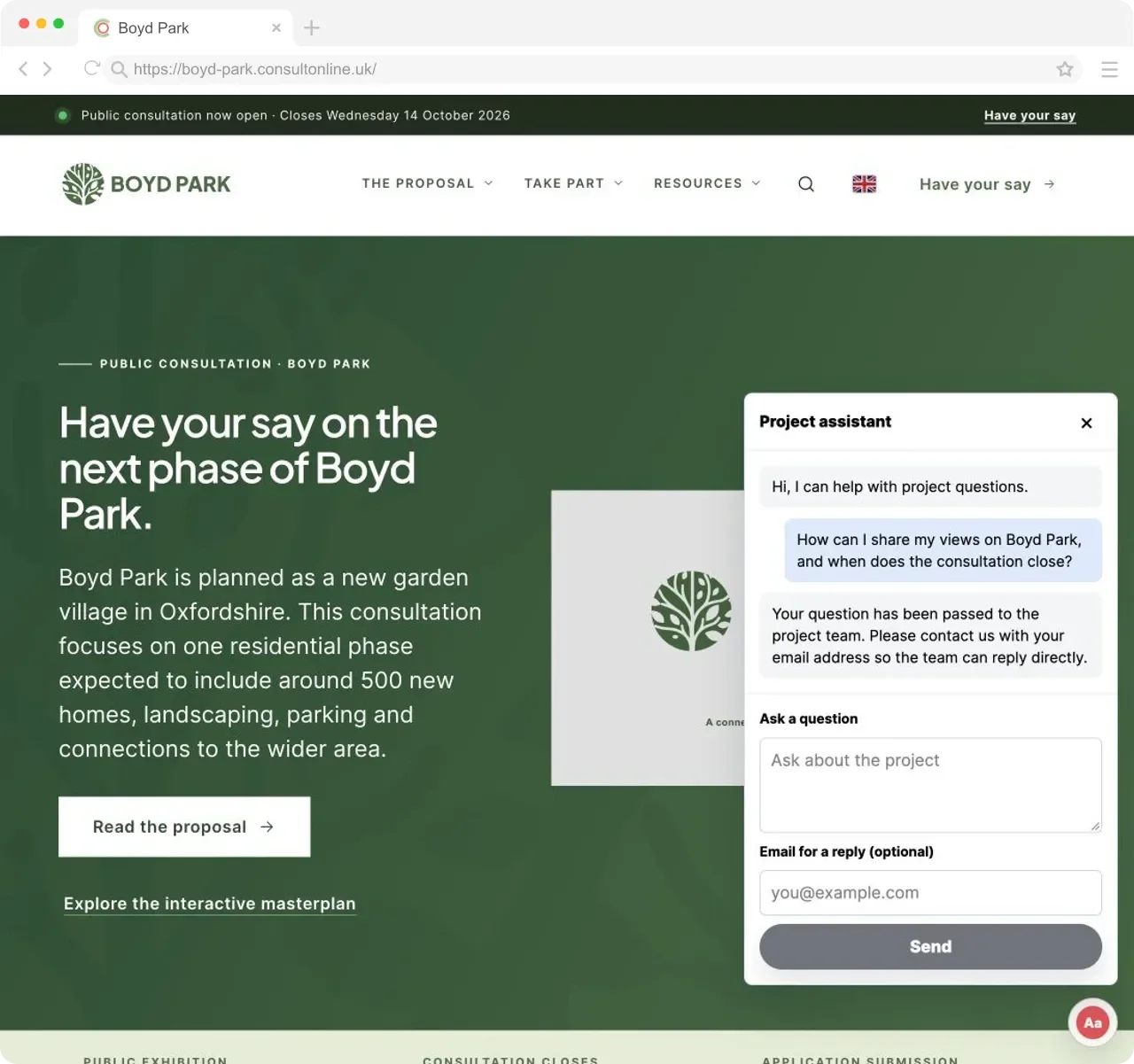
24/7 Availability
Residents often look at planning documents outside office hours. The chatbot can respond at any time and direct people to published information or your team’s contact details. Response quality depends on the available source content and the question asked.
Source Citations Included
When the chatbot retrieves relevant consultation content, its answer includes links to the supporting documents, pages or FAQ entries. Residents can check the source material and contact your team if they need clarification.
Reduced Support Volume
The majority of questions residents ask about consultations are factual — deadlines, locations, what is being proposed, how to respond. The chatbot handles these routine enquiries automatically, freeing your team to focus on complex stakeholder engagement, report writing and project management rather than answering the same questions repeatedly.
The Information Gap
Giving residents timely answers about planning consultations
Planning consultations can contain large volumes of technical information. Residents may need a quick route to a deadline, proposal detail or response form without searching through multiple documents.
ConsultOnline’s chatbot uses indexed consultation content to generate an answer and can provide links to relevant sources. It is designed to stay grounded in published material and to direct residents to your team when it cannot find suitable information. As with any automated system, teams should review conversations and important answers.
Used alongside accessible pages, documents and human contact routes, the chatbot gives residents another way to find and understand consultation information.
How It Works
From documents to answers in three steps
Upload Your Content
Add your consultation documents, FAQ answers and microsite page content. The chatbot automatically processes and indexes everything — PDFs, Word documents, web pages and structured FAQs. It understands the full context of your consultation so it can draw on any published material when answering questions.
Embed on Your Microsite
The chatbot appears as an accessible widget on your consultation microsite, ready for residents to use. It sits alongside your existing content — surveys, maps, documents and event listings — giving visitors an additional way to find the information they need without navigating away from the page.
Residents Ask, It Answers
Residents can ask questions in plain language. The chatbot is designed to answer from indexed published content and show relevant source links, but it can be wrong, miss context or fail to recognise an unsupported question. Teams should review conversations and make human contact details independently visible.
Use Cases
Intelligent support across every consultation scenario
From answering routine questions to surfacing hard-to-find details in technical documents, the chatbot supports residents and project managers alike.
Routine Resident Questions
The chatbot can answer common questions from indexed consultation content and show relevant source links. Automated answers can be wrong or miss context, so conversation review and a clear route to human support remain necessary.
Navigating Technical Documents
Residents should not need to read a 200-page environmental assessment to find out about flood risk on their street. The chatbot can surface specific details from technical documents and explain them in plain language, with a citation linking to the exact source so residents can read the full context if they wish.
Multilingual Support
Where multilingual support is configured, the chatbot can respond in supported languages. Automated translation and answers may contain errors, so important or formal content should be reviewed by a suitably qualified person and alternative contact routes should remain available.
Admin Dashboard Assistant
The chatbot is not just for residents. It also appears in the admin dashboard, where project managers can use it to quickly find information across their consultation content. Need to check what the transport assessment says about junction capacity? Ask the assistant instead of searching through files manually.
Conversation Insights
Where logging is enabled and permitted, available chatbot conversations can be reviewed to identify recurring questions or possible content gaps. Coverage depends on consent, configuration, retention and technical operation and the logs do not represent all community concerns.
Graceful Escalation
The chatbot is designed to recognise when it lacks suitable published information and direct the resident to your team’s contact details. Conversation review remains important because no automated system can guarantee a correct response in every case.
See the intelligent chatbot in action
Book a short demo and we will show you how the chatbot answers real resident questions using your consultation content — with source citations, graceful escalation and conversation logging.
Capabilities
Intelligent assistance built for consultations
Everything the chatbot can do, from answering resident questions on your microsite to giving your project managers a faster way to search consultation content.
Feature Deep Dive
Chatbot features in detail
A closer look at how the intelligent chatbot works and what makes it well suited to public planning consultations.
Content Training
The chatbot is trained exclusively on the content you publish for each consultation. Upload PDFs, Word documents or point it at your microsite pages and FAQ entries. The system processes and indexes this content so the chatbot can draw on it when answering questions. When you update your documents, the chatbot’s knowledge updates too — no manual retraining required.
Source Citations
Answers can include clickable links to relevant source documents or pages. These links help residents check the underlying consultation material and explore the context.
Graceful Escalation
The chatbot is designed to recognise some questions that fall outside the indexed consultation content and can direct residents to configured contact details. It may not identify every unsupported question, so teams should review conversations and make human support details independently visible.
Conversation Logging
Conversation records available under the selected configuration can be reviewed and searched in the admin dashboard. Coverage depends on logging, consent, access and retention settings and should not be treated as representative evidence of what the wider community cares about.
Topic Insights
The dashboard surfaces the most frequently asked topics, questions the chatbot could not answer and emerging themes across conversations. Use these insights to identify content gaps on your microsite, update your FAQ and understand which aspects of the consultation are generating the most community interest or concern — before those concerns appear in formal responses.
Admin Dashboard Assistant
The same intelligent assistant is available within the admin dashboard for your project managers. Need to quickly check what the design guide says about building heights, or find the relevant section of the environmental statement? Ask the assistant instead of manually searching through uploaded documents. It is a productivity tool for your team as well as a public-facing feature.
FAQ
Frequently asked questions
Ready to give your residents 24/7 consultation support?
Give residents another way to find information from your published consultation content, with source links and a route to contact your team when human help is needed.
More features to discover